
What is a Default schedule?
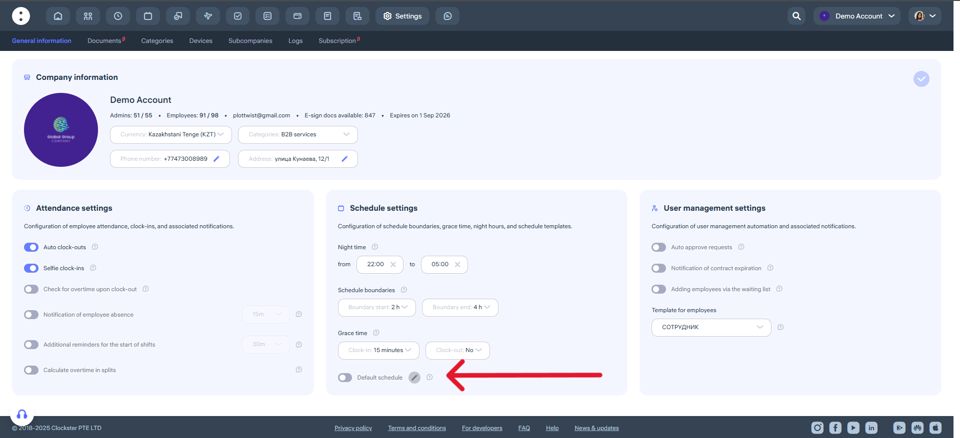
The default schedule is automatically set for all new employees. It is made so that each employee has a work schedule to display the correct data in the reports.
On the top menu go to “Settings” and in the Schedule settings section “Default schedule” toggle can be found.
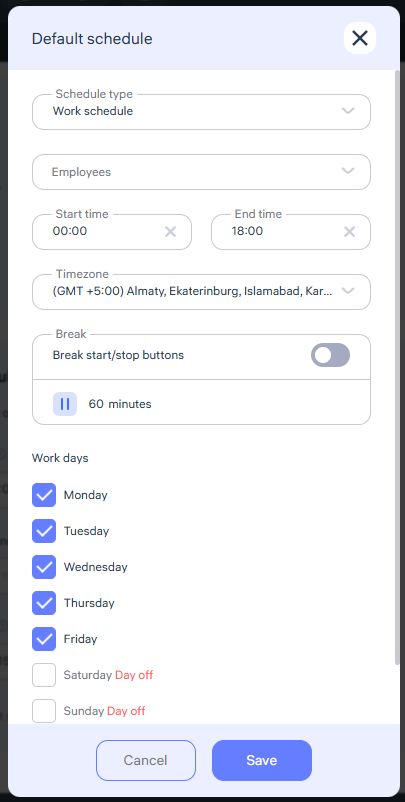
Fill in all the sections and click “Save”
The Default schedule functionality cannot be removed, this update prevents new employees from having no schedule (in case the employer may have forgotten to create a schedule).
Important!
The default schedule can be overridden by creating a new schedule.
If some employees have different schedules, you can adjust them manually in the Schedules section or employees can make a request to change the schedule. However, once a new employee is added and the toggle is enabled, the default schedule will be applied automatically.
Updated at
Related questions
- What types of schedules are there?
- How to create a schedule 5/2 or 6/1? / Schedule – Days of the week.
- How to create a schedule 2/2 or 14/14? / Schedule – shift schedule.
- How do I create a day off/holiday/sick day schedule? / Leave schedule
- How do I create a schedule without a specific time period? / Free schedule