
How to enable breaktime records in the work schedule?
The Break clock-in function allows employees to record the start and end of their breaks.
When can be used:
Break clock-ins are only available if the employee has a work schedule assigned.
Instead of manually entering the number of minutes, the employee must use the “Start Break” and “End Break” options.
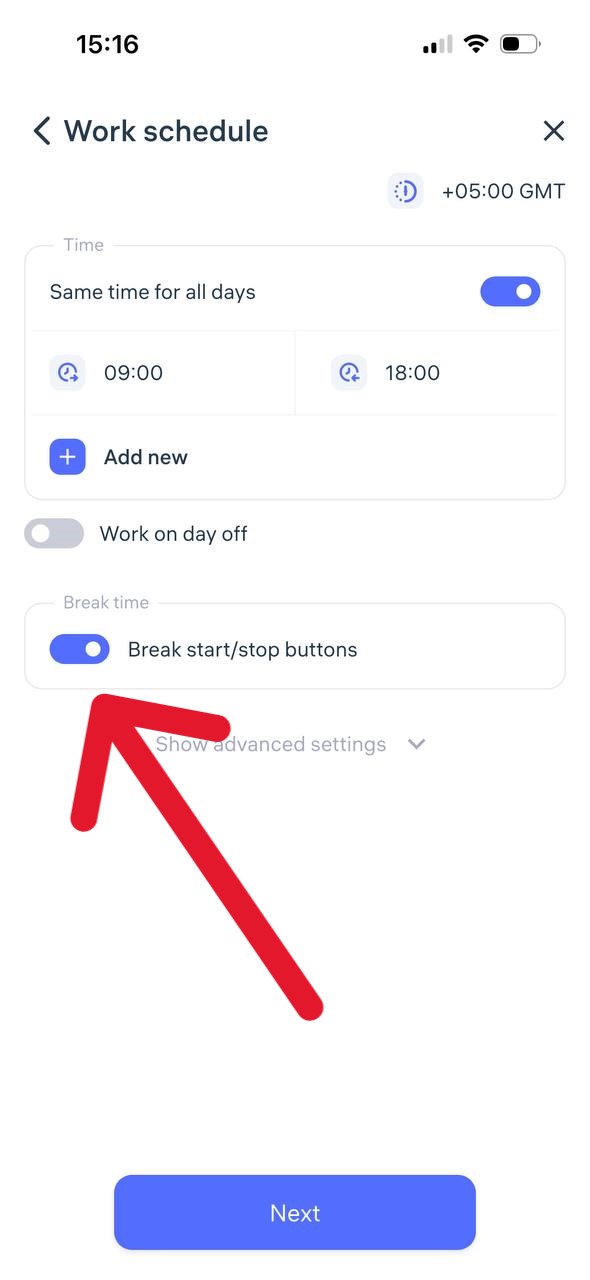
How it works in the mobile app:
On the clock-in creation page, the employee can select “Start Break” or “End Break.”
This function becomes available only after the employee has marked “Clock-in.”
For accurate tracking, both marks — the start and end of the break — must be recorded.
Time calculation:
The number of minutes spent on break is automatically subtracted from the employee’s total working hours.
Updated at
Related questions
- What types of schedules are there?
- How to create a schedule 5/2 or 6/1? / Schedule – Days of the week.
- How to create a schedule 2/2 or 14/14? / Schedule – shift schedule.
- How do I create a day off/holiday/sick day schedule? / Leave schedule
- How do I create a schedule without a specific time period? / Free schedule