
What additional actions can be added to the company settings?
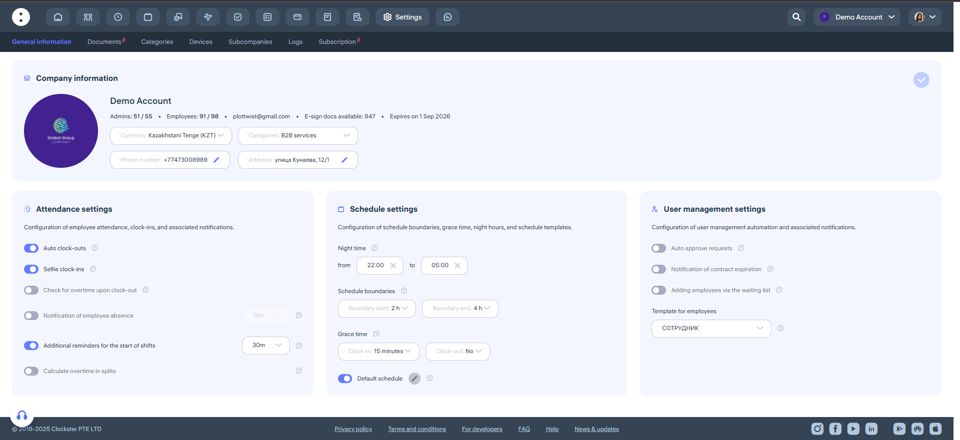
In the Settings → General Information section, you can define key parameters to ensure the system functions correctly.
Company Information
Company currency is used by default in the Payroll module. Salaries can still be assigned in different currencies if needed.
Categories, address, phone number, and email — editable fields that are displayed in the company profile.
Attendance Settings
Auto clock-outs — the system will automatically create a clock-out entry at the end of a scheduled shift if the employee hasn’t done it manually.
Selfie clock-ins — when enabled, employees must take a photo when clocking in and out via the mobile app.
Check for overtime upon clock-out — if an employee stays past their shift, the system will prompt them to send an overtime request.
Notification of employee absence — you can configure how many minutes after a shift starts administrators will be notified about an absent employee.
Additional reminders for the start of shifts — sends an extra reminder to employees before their shift begins, in addition to the default schedule notifications.
Calculate overtime in splits — useful for splitting overtime before and after a scheduled shift.
Schedule Settings
Night time — specify the start and end of the night period used for payroll calculations.
Schedule boundaries — define the allowed window for clock-ins and clock-outs relative to scheduled shift times.
Grace time — set time tolerances for late arrivals or early departures that will not count as violations.
Default schedule — automatically applies to new employees when they are added to the system.
Employee Management Settings
Auto approve requests — all employee requests will be automatically approved by the system.
Notification of contract expiration — enable alerts when an employee’s contract is nearing its end.
Adding employees via the waiting list — new employees can only be added after approval by a key administrator.
Template for employees — automatically applies predefined settings when adding a new employee.
Updated at