
Next Step – Categories Section
Purpose of the main company categories in Clockster
1. Data organization:
Categories help organize employees by departments, job titles, and locations, simplifying data management within the company.
2. Access management:
Categories can be used to control access levels for employees, granting permissions based on their roles or responsibilities in the system.
3. Reporting and analytics:
By grouping employees into categories, you can easily generate reports and analyze data such as working hours, absences, and other metrics focused on specific employee groups.
4. Schedule management:
Categories can be used when creating and managing work schedules, making it easier to track time and provide flexible scheduling for different employee groups.
Creating Categories
1. Location category
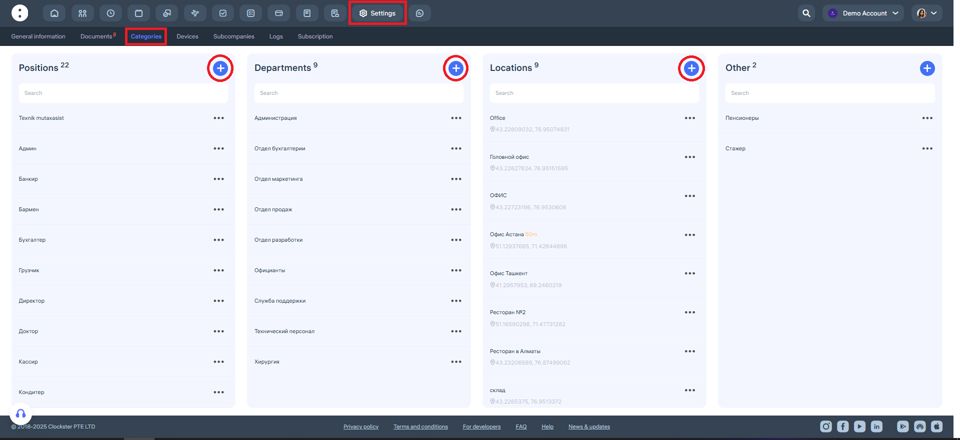
Go to the “Locations” category and click “ + ”.
Create and save all the current locations of your organization where employees are expected to clock in and out.
The created locations will appear in a list during new employee registration, allowing them to be linked to their main workplace.
Setting location coordinates in Clockster is crucial for geo-fencing employee attendance.
When coordinates are defined, the system can accurately verify the employee’s geographical location when they clock in or out.
2. Accessing the Categories section
Go to “Settings” on the left side of the screen.
This menu contains all company settings and information.
Find the “Categories” section and open it.
3. Positions category
In the “Positions” category, click “+” and enter all the positions that exist in your company.
4. Department category
In the “Department” category, click “+” and specify the names of your departments, divisions, or functional teams.
For example: “Sales Department,” “HR,” “IT Division,” etc.
5. Other category
The “Other” category is designed for grouping employees by a specific characteristic that:
Is not related to their job title,
Is not related to their department,
But is still important for separate tracking or management purposes.
You can also assign a dedicated manager to the “Other” category, who will be responsible only for the employees within that group.
Note: The “Other” category does not replace an employee’s main department or position — it serves as an additional organizational tool.
An employee can simultaneously have:
A Department,
A Position, and
An “Other” category assigned.
Updated at